
A transcript is what a video says. A lot of video says nothing at all.
Video Scene Analysis API: What a Video Shows, Next to What It Says
Most video pipelines read the transcript and stop there. That works for a podcast or a talking head. It fails quietly on every video that shows more than it says: a product demo without a voice-over, a price written on screen, a recipe filmed over music, a clip whose caption says one thing while the footage shows another. The transcript comes back empty, or short and beside the point, and nothing in your data says the video was never really read.
If you check claims, monitor a brand, build a dataset or run AI agents over social video at volume, those are exactly the videos you cannot skip, and nobody is going to open them one by one.
The /v1/watch endpoint reads the picture as well. Below: one real answer, the call, how to line up speech and picture, four things to build with it, and what it costs.
Key Takeaways
- One call, two readings: the scenes and the transcript come back in the same JSON, on the same clock, so you can tell what was on screen while something was said.
- A video without speech is an answer, not an error: the scenes are returned, the transcript is empty, and
transcript_errorsays why. - The text on screen comes back as written: titles, labels, quantities and handles land in
on_screen_text, scene by scene. - You pay for the frames analyzed: 1 credit = 1,000 frames, and the number of frames follows the video, few on a fixed shot, more on a fast-cut clip.
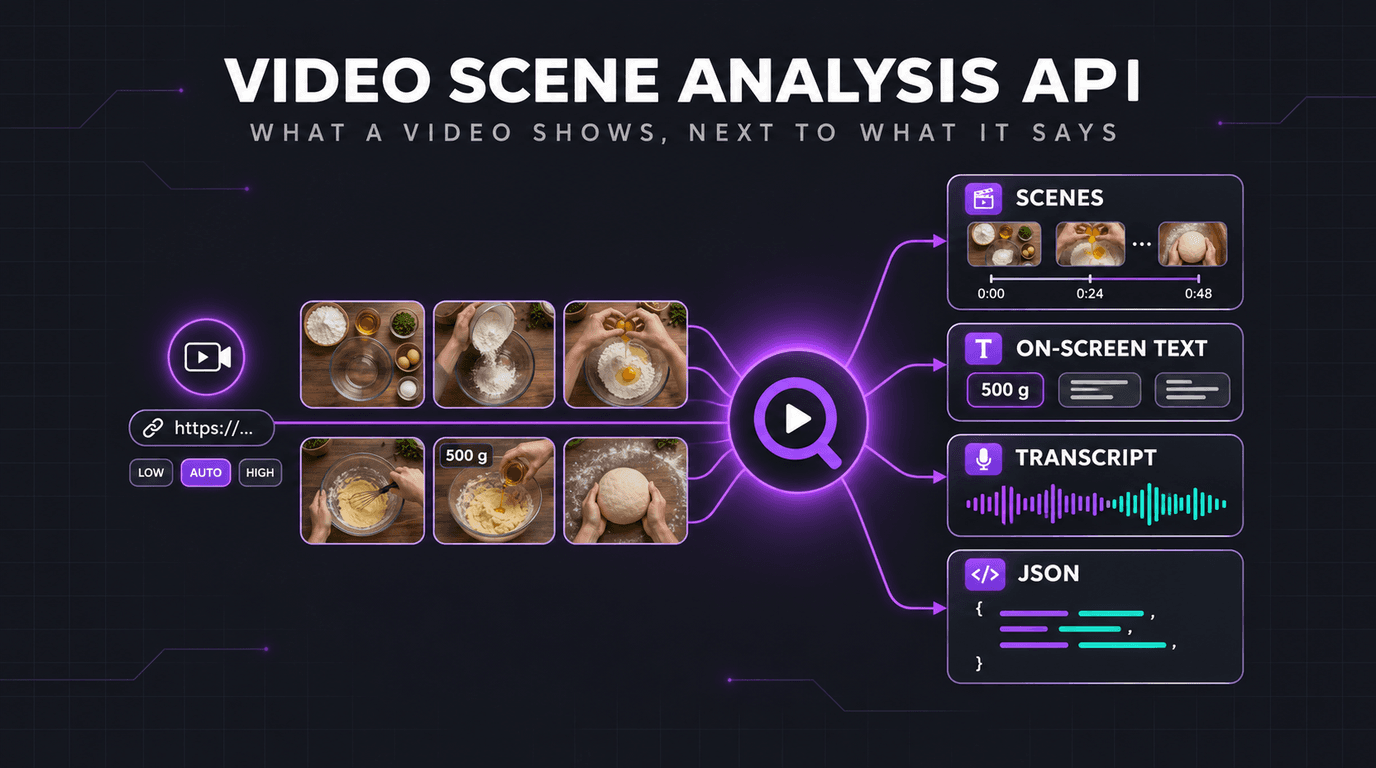
A video that says nothing
Take Patê de frango cremoso, a 78-second recipe published on Dailymotion by Receitas TudoGostoso. It is filmed from above, over music. Nobody speaks. The ingredients and their quantities are written on screen as they go into the bowl.
Here is what a default call to /v1/watch returned for it: the data block of the real response, cut short with ... and nothing else changed.
The transcript holds what the audio holds: its first segment is the word Música, music. Read through its transcript alone, this video is an empty row in your table. The 30 scenes tell the rest. These are the ones that carry the recipe:
| Scene | on_screen_text | description |
|---|---|---|
| 0–2 s | PATÊ DE FRANGO CREMOSO | A wooden table holds several bowls, including a small green bowl filled with crackers and a larger green bowl containing a salad. |
| 6–8 s | FRANGO DESFIADO COZIDO 500 g | A hand pours shredded chicken from a red and white patterned bowl into a clear glass bowl. |
| 8–10 s | MAIONESE 300 g | A person uses a green spatula to mix mayonnaise into a glass bowl containing shredded chicken. |
| 17–20 s | REQUEIJÃO 250 g | A person pours a white creamy substance from a container into a glass bowl containing a mixture. |
| 27–29 s | 2 CENOURAS RALADAS | Shredded carrots are being poured from a green bowl into a large glass bowl containing a white mixture. ... |
| 29–32 s | MILHO VERDE 250 g | A person is pouring corn from a small bowl into a large glass bowl that already contains shredded carrots and a white mixture. ... |
| 32–34 s | AZEITONA VERDE 250 g | Green olives are being poured from an orange bowl into a large glass bowl containing corn and shredded carrots. ... |
| 36–39 s | CHEIRO-VERDE A GOSTO | A person is adding green herbs to a large glass bowl containing a mixture of corn, olives, and carrots. ... |
The dish and seven ingredient labels, quantities included, read off the screen in Portuguese, each with the second it appears. The last scene returns the end card with the channel's handles as written. The whole answer took 12 seconds: 30 frames analyzed, 30 scenes.
Two things in that answer are worth a second look.
The call did not fail. A video without speech is not an error. Here the audio produced a music marker; when there is no transcript at all, transcript comes back empty, transcript_error says why, and the scenes are returned all the same. Your pipeline does not need a special case for silent videos.
The picture can disagree with the text around the video. The description published with this video lists 2 colheres (sopa) de requeijão, two tablespoons. The video shows REQUEIJÃO 250 g. Both are in the same response, one in video_info.description, the other in on_screen_text, and only one of them is what viewers saw. You cannot catch that with a transcript, or with the metadata.
One call
The request is a video URL. Three options are there when you need them: detail sets how closely the picture is followed, include_transcript set to false returns the scenes alone, and transcript_text returns the transcript as one string instead of segments.
It works with every platform of the transcript and transcribe endpoints: YouTube, TikTok, Instagram, X (Twitter), Facebook, Vimeo, Dailymotion, Loom and Snapchat. It takes the URL of an online video, not an uploaded file.
The response holds video_info, transcript, scenes and frames_analyzed. Each scene is four fields: start and end in seconds, description, and on_screen_text, empty when nothing is written on screen. The endpoint reference documents every field, and the watching videos guide walks through the SDK calls.
Speech and picture on one clock
Scenes and transcript segments are both timed in seconds from the beginning of the video. To know what was on screen while something was said, look for the scene that contains the start of the segment.
That join is where the two readings become more than their sum: a spoken claim next to the footage shown at that moment, a product name said next to the label visible on the packaging, a voice-over next to the chart it comments.
Four things to build with it
1. Check what was shown, not what was claimed. A caption, a post or a voice-over makes a claim about a video. The scenes say what the footage contains and at which second. Store description and on_screen_text next to the claim and a reviewer checks it against the picture without opening the video, as with the two tablespoons above. It pairs with claim analysis when the claim comes from a post on X.
2. Monitor a brand or a market where nobody speaks. Prices, product names, offers and disclaimers are often written, not said. Run a keyword search, watch the videos it returns, and search on_screen_text for the names you track: the silent demos and the text-on-footage clips are in your results at last.
3. Build a dataset with one row per scene. A scene is already a record: start, end, description, text on screen. Add the transcript segments that fall inside it and you have aligned picture-and-speech rows for retrieval, evaluation or training, produced by an API call rather than by annotators. From there, schema-based extraction turns the spoken part into typed columns.
4. Give an agent a way to read a video. An agent that only has the transcript answers “what happens in this video?” from the audio. The watch_video tool of the VidNavigator MCP server and the /watch skill of vidnavigator/skills hand it the scenes as text, so it can reason about what is shown, quote the on-screen text, and point to the second, without opening the video itself.
How closely to look: detail
You do not give the endpoint a number of frames. A frame is taken where the picture changes, and at least one every 10 seconds; detail sets how small a change counts. The number of frames therefore depends on the video, few on a fixed shot, more on a fast-cut clip, and the response reports it in frames_analyzed: 30 for the 78-second recipe at the default level.
detail | Use it for |
|---|---|
| low | A rough idea of the picture: a talk, an interview, a long video that mostly shows the same thing. |
| auto | The default. Suits most videos. |
| high | Fast cuts, or something brief or small on screen: a slide shown for a moment, a price tag, a logo. |
One limit to keep in mind: the picture is followed scene by scene, so something that stays on screen for an instant can fall between two frames. When a brief or small detail matters, use high.
Long videos, and many of them
The synchronous call answers in the response, for videos up to 10 minutes. Beyond that, POST /v1/watch/async returns a task id at once and takes videos up to 2 hours, and any length on YouTube. You read the result on GET /v1/watch/{task_id}, or pass a webhook_url and get called when the job finishes.
With the SDKs, submit_watch_video in Python and vn.watch.submit in JavaScript return a job without waiting. That is the pattern for volume: submit a list of URLs, collect the results, keep the scenes you care about.
What it costs
Watching is billed by the frames analyzed: 1 credit = 1,000 frames. There is a floor of 334 frames per hour of video, so an hour of video watched never costs less than an hour of transcription. The fetch of the video is charged as for a transcript, and speech-to-text only when the video has no captions.
As a guide, at the default level, a fixed shot stays at the minimum, about 0.33 credit per hour of video, and an hour of television programme is typically between 0.5 and 1 credit.
Three measured examples, all at the default level: a 61-minute news programme was analyzed for 589 frames (0.59 credit), a programme of 1 h 58 for 1,007 frames (1.01 credit), and the 78-second recipe above for 30 frames (0.03 credit). With everything else the call is charged for, the recipe came to about 0.037 credit in total.
Set include_usage to see what a call was charged, and see the pricing page for what a credit is.
Conclusion
A transcript reads half of a video, and on some videos it is the smaller half. With /v1/watch, the other half arrives in the same JSON: what is on screen, when, and the text written on it. The recipe that was an empty row is now a list of ingredients with quantities. The solution page has the parameters, the response fields and the pricing in one place.
Frequently Asked Questions
What does the /v1/watch endpoint return?
How is this different from a transcript?
What happens when a video has no speech?
Which platforms are supported?
How long can a video be?
What does the detail parameter change?
How much does it cost to watch a video?
Can an AI agent use it?
Next Steps
Related
All VidNavigator solutions
- Universal Transcript Retrieval API
- YouTube Transcript API
- TikTok Transcription API
- TikTok Profile Scraper API
- TikTok Search API
- Instagram Transcription API
- Facebook Transcription API
- AI Video Search Engine
- Video Analysis API
- Video Scene Analysis API
- Video Data Extraction API
- YouTube Channel Search
- YouTube Channel Strategy
- Tweet Claim Analysis
- X (Twitter) Video Proof